Minecraft Bedrock Mods: Add-ons That Reshape Every World

Minecraft Bedrock mods let you add new mobs, machines, furniture and survival systems to Android, iOS and Windows worlds. Discover curated add-ons, import packs in minutes, and play with clear, step-by-step setup and safety guidance.

21 in-depth guidesCovers Android, iOS & WindowsUpdated

Written for Bedrock 26.60

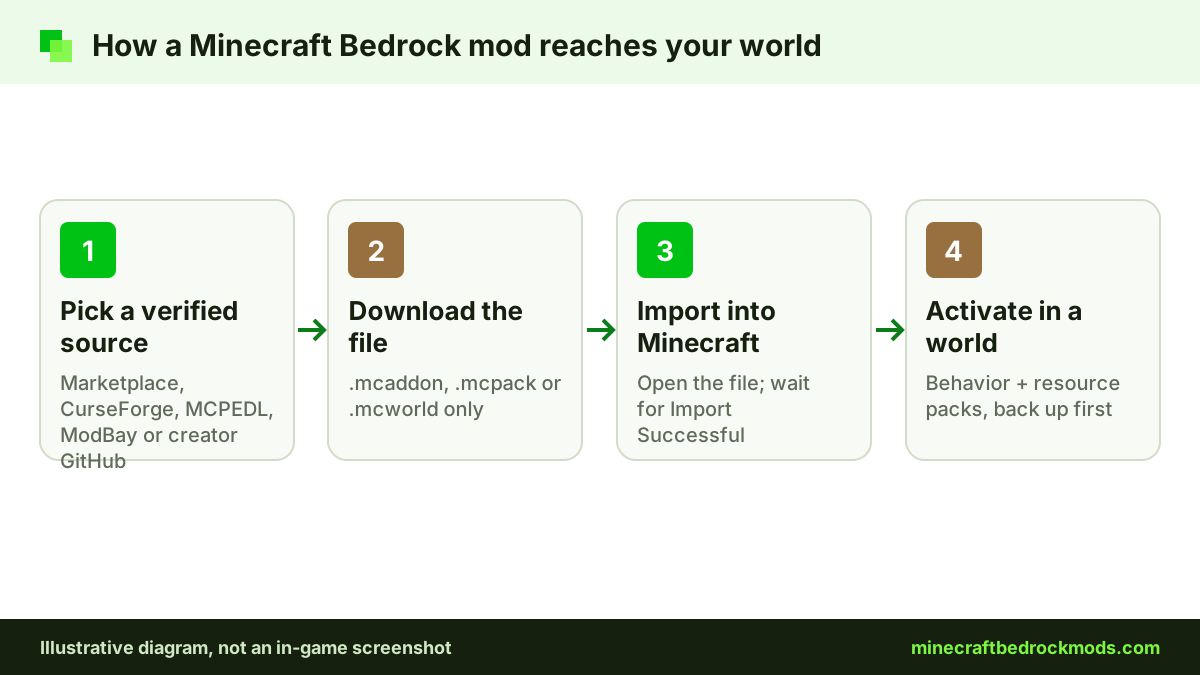
Diagram of how Minecraft Bedrock mods are installed: verified source, download, import and activate in a world
Diagram: The four steps every Bedrock add-on follows. We will replace this diagram with a real gameplay screenshot once one is supplied.
Top picks

Top 10 Minecraft Bedrock Mods

Named add-ons we checked on their official source pages. Each row links to the full write-up in our best mods guide.

ModTypeBest forPlatformPerformance
Naturalist Add-OnMobs & WildlifeWildlife lovers on any platformAll Bedrock platforms incl. consolesMedium
Another Furniture Add-OnBuilding & FurnitureBuilders on any platformAll Bedrock platforms incl. consolesLight
Advanced WaypointsQoL & HUDExplorers who get lostAndroid, iOS, WindowsLight
Faithful 32x BedrockTexture & ShadersPhones and mid-range devicesAndroid, iOS, WindowsLight
UtilityCraftTech & AutomationFactory and resource buildsAndroid, iOS, WindowsHeavy
Biomes O' DiscoverySurvivalExplorers who want new terrainAndroid, iOS, WindowsMedium
Spark Pets Add-On (Lite)Mobs & WildlifeYounger players and familiesAll Bedrock platforms incl. consolesLight
Bare Bones Texture PackTexture & ShadersLow-end devices and clean visualsAndroid, iOS, WindowsLight
Chaotic World 2.0Vehicles & CombatPlayers who want harder combatAndroid, iOS, WindowsMedium
DontCryHorrorHorror nights with friendsAndroid, iOS, WindowsMedium
What is it

What Are Minecraft Bedrock Mods?

Minecraft Bedrock mods, officially called add-ons, are packages that change how Bedrock Edition looks and plays on phones, tablets, Windows PCs and, through Marketplace, consoles.

Every add-on is built from two parts. A behavior pack controls logic: what a mob does, how an item works, which recipes exist and when structures spawn. A resource pack controls presentation: textures, 3D models, animations, sounds and interface art. Most add-ons ship both together as a single .mcaddon file.

Because Bedrock reads these packs natively, there is no mod loader to install. That is the biggest difference from Java Edition, where Fabric or Forge must load .jar files. The trade-off is that add-ons work inside the systems Mojang exposes, so they are easier to install but cannot rewrite the engine itself.

  • .mcaddon
  • .mcpack
  • .mcworld
  • .mctemplate
  • Script API
Features

Why Players Love Bedrock Add-ons

From quick quality-of-life tweaks to full survival overhauls, add-ons extend Bedrock without breaking its simplicity.

01

One-tap imports, no loaders

Bedrock add-ons arrive as .mcpack, .mcaddon or .mcworld files. Open one and Minecraft imports it on its own, with no mod loader, launcher profile or folder digging required.

  • Behavior and resource packs bundled together
  • Works the same on phones, tablets and Windows
  • Packs stay in your library for any future world
02

Cross-platform multiplayer

Friends on other Bedrock devices automatically receive the resource packs your world uses when they join.

03

New mobs, gear and bosses

Add creatures, weapons, armor sets and boss fights that sit alongside vanilla survival.

04

Building and decoration

Furniture, new block palettes and structure packs give builders far more detail to work with.

05

Automation and tech

Machines, conveyors and storage networks expand what is possible beyond vanilla redstone.

06

Visual makeovers

Resource packs restyle textures, lighting, UI and sounds without touching gameplay or achievements.

How it works

From Download to Gameplay in Four Steps

Every Bedrock add-on follows the same path, whichever device you play on.

01

Pick an add-on

Choose a pack that matches your game version and platform, and read its requirements before downloading.

02

Import the file

Open the .mcaddon or .mcpack file. Minecraft launches and confirms each pack was imported.

03

Activate in a world

In World Settings, add the behavior and resource packs, and enable any experiments the creator lists.

04

Play and fine-tune

Load the world, test the new content and adjust pack order or settings if something looks off.

Installation

How to Install Minecraft Bedrock Mods

Choose your platform for exact steps. The process takes a couple of minutes once you have the file.

  1. Update MinecraftInstall the latest Minecraft Bedrock version from Google Play so newer add-ons import cleanly.
  2. Download the packSave the .mcaddon or .mcpack file from a trusted source. It usually lands in your Downloads folder.
  3. Open with MinecraftTap the file in your file manager and choose Minecraft. Wait for the “Import Successful” message.
  4. Create or edit a worldGo to Play, create a new world or press the pencil icon on an existing one. Back up existing worlds first.
  5. Activate both packsUnder Behavior Packs and Resource Packs, select the add-on and press Activate. Turn on any listed experiments.
  6. Load and testStart the world and spawn or craft something from the add-on to confirm it works.
  1. Update MinecraftGet the latest Bedrock release from the App Store before importing anything new.
  2. Save to FilesDownload the add-on in Safari and let it save to the Files app, usually under Downloads.
  3. Share to MinecraftOpen the file in Files, tap Share and choose Minecraft from the app list to import it.
  4. Open world settingsCreate a new world or edit a backed-up copy of an existing world.
  5. Activate the packsApply the behavior and resource packs, then switch on any experiments the creator requires.
  6. PlayLoad in and check the new content. If a file shows as text, rename it to keep the .mcaddon extension.
  1. Install Bedrock EditionMake sure you are running Minecraft for Windows (Bedrock), not Java Edition, and that it is up to date.
  2. Download the add-onSave the .mcaddon or .mcpack file and confirm Windows has not renamed it to .zip.
  3. Double-click to importDouble-click the file. Minecraft opens and imports the packs automatically.
  4. Prepare a worldBack up your save, then create a new world or edit the existing one from the Play screen.
  5. Activate packsAdd the behavior and resource packs and enable the specific experiments the add-on lists.
  6. Check pack orderIf two resource packs clash, move the one you want to win to the top of the active list.
Use cases

Ways Players Use Bedrock Add-ons

Match add-ons to how you actually play, rather than installing everything at once.

Survival overhauls

Harder mobs, new ores, thirst or temperature systems that make long survival worlds feel fresh again.

Survival veterans

Creative building

Furniture, decor blocks and structure packs that let builders add detail vanilla blocks cannot.

Builders

Friends and family worlds

Shared worlds where every Bedrock device receives the packs automatically on join.

Multiplayer groups

Horror nights

Ambient sounds, darker visuals and stalker mobs for tense sessions with friends.

Thrill seekers

Tech and automation

Machines, generators and storage networks for players who love building systems.

Engineers

New creatures

Wildlife, pets and bosses that fill biomes with more life and challenge.

Explorers
Texture packs & shaders

Bedrock Texture Packs, RTX and Vibrant Visuals

Resource packs change how Bedrock looks without touching gameplay. Vibrant Visuals is Mojang's own graphics upgrade, with lighting and shadow effects, and it runs on compatible Windows, Xbox, PlayStation, Android and iOS devices. RTX ray tracing is a separate, Windows-only mode that needs an RTX-capable pack. Packs such as Faithful, Bare Bones and RealSource restyle textures, and our guide explains which ones suit low-end phones.

Texture packs & shaders guide

Realms & multiplayer

Add-ons on Realms and With Friends

Bedrock add-ons work in multiplayer too. Minecraft's Help Center explains how a Realm owner activates packs from the Realm Hub, under World and then Edit World, and players who join receive the resource packs they need. Console friends can join modded Realms and worlds, but they cannot import community files themselves. Our Realms and console guides walk through both sides.

Realms & multiplayer guide Console guide

Mods download

Browse Bedrock Add-ons by Category

A preview of our download tabs. Every card links to the creator's official page or a reputable host, never to a re-upload.

Survival Minecraft Bedrock mods

World-generation and survival expansions that add biomes, dungeons, bosses and progression to long-running worlds. Read the starter add-ons guide.

Biomes O' Discovery

Adds new and improved biomes, unique trees and fresh crops to world generation.

Creator
ZorroCraft
Version
See source page
Game version
See source page
Platform
Android, iOS, Windows
Price
Free
Performance
Medium

RPG++

Expands survival with RPG systems, dungeons, bosses and magic.

Creator
Serty
Version
See source page
Game version
Current release; older builds (from 1.21.60) via the creator's Discord
Platform
Android, iOS, Windows
Price
Free
Performance
Heavy

Building & Furniture Minecraft Bedrock mods

Furniture and decoration add-ons for builders. Both picks here are official Marketplace add-ons, so they also work on consoles. Read the free vs Marketplace guide.

Another Furniture Add-On

Official Marketplace furniture add-on with chairs, tables, shelves and more for builders.

Creator
Starfish Studios
Version
See source page
Game version
See source page
Platform
All Bedrock platforms incl. consoles
Price
Free (Marketplace)
Performance
Light

Decocraft

Official Bedrock version of Decocraft with over 1,500 placeable decorations and animated furniture.

Creator
Razzleberries
Version
See source page
Game version
See source page
Platform
All Bedrock platforms incl. consoles
Price
Paid (Minecoins)
Performance
Medium

Tech & Automation Minecraft Bedrock mods

Machines, generators and automation systems that go beyond vanilla redstone. Read the tech and automation guide.

UtilityCraft

Automation add-on pack with machines, generators, spawners, bonsais and fluid systems.

Creator
DoriosStudios
Version
See source page
Game version
See source page
Platform
Android, iOS, Windows
Price
Free
Performance
Heavy

Epic Machinery

A tech and automation add-on with machines for Bedrock survival worlds.

Creator
ZorroCraft
Version
See source page
Game version
See source page
Platform
Android, iOS, Windows
Price
Free
Performance
Medium

Mobs & Wildlife Minecraft Bedrock mods

New animals and companions. Both picks are Marketplace add-ons, available on every Bedrock platform. Read the mob and wildlife guide.

Naturalist Add-On

Official Bedrock edition of the Naturalist Java mod, with 200+ animals and babies across every biome.

Creator
Starfish Studios
Version
26.2 (listing title)
Game version
See source page
Platform
All Bedrock platforms incl. consoles
Price
Paid (Minecoins)
Performance
Medium

Spark Pets Add-On (Lite)

Adds 10 cute pets with colors, outfits, treats and tricks.

Creator
Spark Universe
Version
See source page
Game version
See source page
Platform
All Bedrock platforms incl. consoles
Price
Free (Marketplace)
Performance
Light

Horror Minecraft Bedrock mods

Stalker-style horror add-ons. Intense for younger players, so read our family safety notes first. Read the horror add-ons guide.

DontCry

Official Bedrock port of the DontCry stalker mod, with creatures inspired by scripted horror videos.

Creator
Omayoba
Version
See source page
Game version
See source page
Platform
Android, iOS, Windows
Price
Free
Performance
Medium

The Bloody Mist

Horror add-on with a creepy entity that stalks and torments players.

Creator
Zaddoc
Version
See source page
Game version
See source page
Platform
Android, iOS, Windows
Price
Free
Performance
Light

Texture & Shaders Minecraft Bedrock mods

Resource packs that restyle the game, from faithful high-resolution textures to realistic packs built for Vibrant Visuals and RTX. Read the texture packs and shaders guide.

Faithful 64x: Bedrock

Quadruple-resolution textures that keep the vanilla look with far more detail.

Creator
Faithful Resource Pack team
Version
See source page
Game version
See source page
Platform
Android, iOS, Windows
Price
Free
Performance
Medium

Faithful 32x Bedrock

Double-resolution vanilla-style textures; the lighter Faithful option for phones.

Creator
Faithful Resource Pack team
Version
September 2026 hotfix
Game version
26.x
Platform
Android, iOS, Windows
Price
Free
Performance
Light

See all 4 Texture & Shaders picks

QoL & HUD Minecraft Bedrock mods

Quality-of-life add-ons such as waypoints that make exploring and finding your way home easier. Read the storage and QoL guide.

Advanced Waypoints

Create waypoints in your world so you can always find your way back home.

Creator
Endermen76428
Version
v8.1 (GitHub release)
Game version
See source page
Platform
Android, iOS, Windows
Price
Free
Performance
Light

Waypoints Everywhere!

Lightweight add-on that brings waypoints to Bedrock Edition.

Creator
Hatchibombotar
Version
v1.0.0 (GitHub release)
Game version
1.21.40 or newer (as listed)
Platform
Android, iOS, Windows
Price
Free
Performance
Light

Vehicles & Combat Minecraft Bedrock mods

Driveable vehicles and combat overhauls with new weapons and boss fights. Read the best mods list.

Simple Vehicles Addon

Adds a large set of driveable vehicles for solo play or roleplay with friends.

Creator
RMPlaysMC_YT
Version
3.5.2 (latest file listed)
Game version
See source page
Platform
Android, iOS, Windows
Price
Free
Performance
Heavy

Chaotic World 2.0

Combat overhaul with multi-phase boss fights, 20 skill weapons and knockback-reducing armor sets.

Creator
YTAUN
Version
2.0
Game version
See source page
Platform
Android, iOS, Windows
Price
Free
Performance
Medium

Open all mods download tabs

Latest guides

All 21 Minecraft Bedrock Mods Guides

Every guide on the site, newest first.

Download

Minecraft Bedrock Mods Download for Android

Browse and grab Bedrock add-ons from your phone with our featured app on Google Play, then import them straight into Minecraft.

Install the app from the official Play Store listing, pick the add-ons you want, and follow the installation steps above to activate them in a world. Always back up your worlds before trying new behavior packs.

Bedrock Mods AppListed on Google Play
Platform
Android
Source
Google Play Store
Content
Bedrock add-ons
Works with
Minecraft Bedrock
Install
From the Play Store
Compatibility / vs

Platform Compatibility and Bedrock vs Java

Where add-ons run, and how they differ from Java Edition mods.

PlatformSideloaded add-onsMarketplace add-onsHow it works
Android phones & tabletsYesYesImport by opening the file with Minecraft.
iPhone & iPadYesYesUse Files → Share → Minecraft.
Windows 10 / 11 (Bedrock)YesYesDouble-click the file to import.
XboxNoYesMarketplace content and joined worlds only.
PlayStationNoYesMarketplace content and joined worlds only.
Nintendo SwitchNoYesMarketplace content and joined worlds only.
AspectBedrock add-onsJava mods
File type.mcaddon, .mcpack, .mcworld.jar files
Mod loaderNone, built into the gameFabric, Forge, NeoForge or Quilt
Built withJSON plus the JavaScript Script APIJava code
PlatformsMobile, Windows; consoles via MarketplaceWindows, macOS, Linux
Install methodOpen the file to importCopy into the mods folder
Depth of changesWithin the systems Mojang exposesAlmost anything in the game code
Cross-playYes, across Bedrock devicesJava players only
AchievementsDisabled with behavior packsNot applicable
Troubleshooting

Fix Common Add-on Problems

Most issues come down to versions, file extensions or switched-off experiments.

IMPORT

“Import failed” or duplicate pack

Update Minecraft, then delete the older copy of the pack from Settings → Storage before importing again. Duplicate UUIDs block re-imports.

FILE

File opens as a .zip or text

The extension changed during download. Rename it back to .mcaddon or .mcpack, or re-download using a different browser.

PACK

Pack missing from world settings

Behavior and resource packs live in separate tabs. Check both, and confirm the pack supports your current game version.

EXP

Add-on loaded but nothing changed

Most often the required experiments are off. Enable the exact toggles the creator lists, then reload the world.

TEX

Purple and black textures

The resource pack is missing or inactive. Activate it, or move it higher in the pack list so another pack does not override it.

LAG

Lag or crashes after adding packs

Remove packs one at a time to find the heavy one, lower render distance, and avoid stacking several world-generation or mob overhauls on mobile.

System requirements

Recommended Specs for Modded Bedrock

Recommendations for a smooth experience with add-ons, not official minimums. Heavier packs need more headroom.

Android

  • Operating systemVersion supported by current Minecraft
  • Memory4 GB RAM, 6 GB+ for heavy packs
  • Free storage1 GB+ for packs and backups
  • Game versionLatest Bedrock release
  • File managerAny app that can open files
Headroom for medium add-on loads

iPhone & iPad

  • Operating systemVersion supported by current Minecraft
  • MemoryRecent devices with 4 GB+ RAM
  • Free storage1 GB+ for packs and backups
  • Game versionLatest Bedrock release
  • Import toolBuilt-in Files app
Headroom for medium add-on loads

Windows PC

  • Operating systemWindows 10 or 11, 64-bit
  • Memory8 GB RAM recommended
  • GraphicsDirectX 11 capable GPU
  • Free storage2 GB+ for packs and worlds
  • EditionMinecraft for Windows (Bedrock)
Headroom for medium add-on loads
Safety

Your Add-on Safety Checklist

Six habits that keep your device, account and worlds protected.

Use reputable sources

Stick to the official Marketplace, the CurseForge Bedrock section or long-running community hubs with active comments.

Check the extension

Real add-ons end in .mcaddon, .mcpack, .mcworld or .mctemplate. Anything else deserves suspicion.

Back up every world

Copy or export the world before activating behavior packs so a bad pack never costs you progress.

Read update dates

Prefer packs updated for your current game version, with recent comments confirming they work.

Never share logins

An add-on never needs your Microsoft account password, payment details or a “verification” survey.

Watch permissions

Mobile apps that only browse mods should not need contacts, SMS or accessibility access.

Pros and cons

Pros and Cons of Bedrock Add-ons

An honest look before you start modding your worlds.

+Pros

  • Huge varietyMobs, tech, furniture, magic, visuals and survival systems for every play style.
  • Simple installationNo loaders or launchers, just open the file and activate it.
  • Cross-platform playFriends on other Bedrock devices get resource packs automatically.
  • Works on mobileAndroid and iOS players can mod as easily as PC players.
  • Plenty of free contentLarge community library alongside curated Marketplace packs.

−Cons

  • No achievementsBehavior packs disable achievements for that world.
  • Console limitsXbox, PlayStation and Switch cannot sideload add-ons.
  • Version breakageGame updates can break packs until creators patch them.
  • Shallower than JavaAdd-ons work within Mojang's exposed systems, not raw game code.
  • Risky download pagesAd-heavy mirrors can push fake installers and malware.
Community perspectives

Minecraft Bedrock Mods Reviews

From first-time installs to shared survival worlds: perspectives on our Bedrock add-on guides.

Share your feedback

Sample reviews: Illustrative names, roles, locations and ratings for this preview. These are not verified reader testimonials.

FAQs

Minecraft Bedrock Mods Questions, Answered

Straight answers about installing, using and staying safe with Bedrock add-ons. Need more depth? Our guides cover each topic in detail.

Read the guides

Minecraft Bedrock mods are add-ons for Bedrock Edition. They combine behavior packs, which change how mobs, items and blocks act, with resource packs, which change textures, models and sounds. Unlike Java mods, they need no loader and import straight into the game.

Many community add-ons are free, and Minecraft Marketplace offers both free and paid content bought with Minecoins. Be cautious with “free” download pages that hide files behind endless ad redirects, because those are a common source of unwanted software.

Yes. Android and iPhone or iPad are the easiest platforms for sideloaded add-ons. You open the .mcpack or .mcaddon file, choose Minecraft, and the game imports it automatically. Then you enable the packs in your world settings.

Consoles do not support importing community add-on files. Console players can use add-ons and worlds from Minecraft Marketplace, or join a Realm or world that already has packs applied, but they cannot sideload .mcaddon files directly.

Yes. Worlds that use behavior packs, or that have cheats enabled, have achievements turned off. Resource packs that only change visuals do not affect achievements, so keep a separate unmodded world if you are collecting them.

No. Java mods are .jar files written for Fabric, Forge, NeoForge or Quilt, and Bedrock Edition cannot run them. CurseForge has a dedicated Minecraft Bedrock section, while Modrinth focuses on Java Edition, so always check that a file is a Bedrock add-on.

Some add-ons rely on features Mojang still labels experimental. The creator lists which toggles to switch on in the world’s Experiments settings. Turn on only the ones the add-on asks for, and back up the world first, since experiments can change how a world behaves.

Real add-on files are just packaged JSON, scripts, textures and sounds, so the format itself is low risk. The danger comes from shady download pages, fake installers and .exe or .apk files claiming to install mods. Download from reputable sources and never run an installer for an add-on.

There is no fixed number. What matters is how heavy the packs are and how capable your device is. Several small quality-of-life packs run fine together, but stacking multiple mob, world-generation or texture overhauls can cause lag or conflicts on phones.

The import may have failed, the pack may be built for a newer game version, or you may be looking in the wrong list. Behavior packs and resource packs appear in separate tabs. Update Minecraft, re-import the file and check both tabs.

Yes. When the host world has packs applied, players who join download the required resource packs automatically on most platforms. Everyone needs a compatible game version, and Realms or servers may have their own rules about experimental features.

Back up the world, open its settings, deactivate the behavior and resource packs, then load it to check everything works. Removing a pack can delete custom blocks or mobs it added, so only remove packs from worlds you have backed up.