Minecraft Bedrock mods and Modrinth come up together in search results so often that many players assume the platform is a natural home for Bedrock add-ons. It is a fair guess: Modrinth is one of the best-known names in Minecraft modding, with a clean interface and a strong reputation among creators. The honest answer, though, is that Modrinth is built around Java Edition. Knowing why, and where Bedrock content really lives, will save you a lot of downloads that simply refuse to work on a phone, tablet, Windows PC or console.
This guide explains what Modrinth hosts, why its content cannot run on Bedrock, where Bedrock players should look instead, which famous Java mods now have official Bedrock versions, and how to judge any mod platform.
What Modrinth Actually Hosts
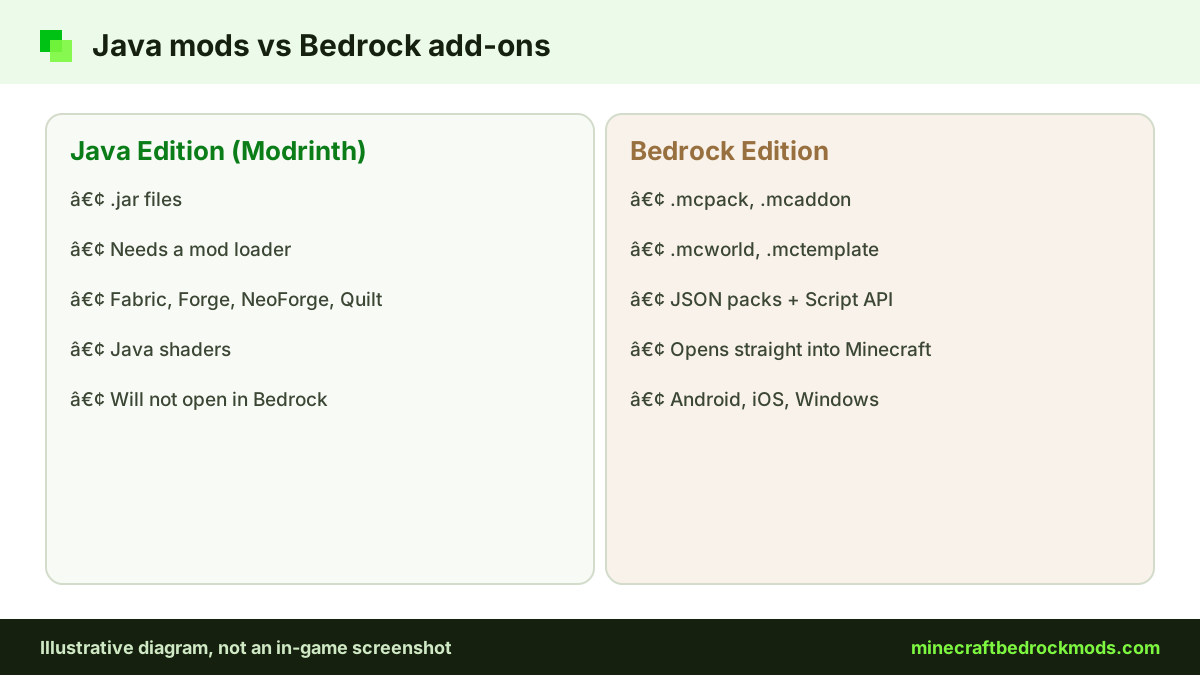
Modrinth is a platform for Minecraft: Java Edition content. Its catalogue is organized around Java mod loaders and the content types the Java community uses:
- Mods for loaders such as Fabric, Forge, NeoForge and Quilt
- Modpacks, curated collections of Java mods that launchers install in one go
- Resource packs in the Java pack format
- Shaders for Java shader loaders
- Plugins and data packs for Java servers and worlds
Every one of those categories assumes the Java game client or server. None of them targets Bedrock's add-on system, which is why Modrinth is not a primary host for Bedrock content.
Why Java .jar Mods Cannot Run on Bedrock
The two editions look similar, but they are separate programs with separate codebases, and that difference goes all the way down to how content loads.
Different engines, different languages
Java Edition mods are compiled .jar files that hook into the game's code through a loader, so they can change almost anything. Bedrock does not load external Java code at all. Instead, it exposes an official add-on system: behavior packs and resource packs defined in JSON, with the Script API letting creators write logic in JavaScript.
Different packaging
Bedrock content arrives as an .mcpack, .mcaddon, .mcworld or .mctemplate file, and opening it imports it into Minecraft on Windows, Android and iOS. A .jar file means nothing to Bedrock. Renaming one will not help, and no legitimate converter turns a compiled Java mod into a working add-on. Any site that promises otherwise, especially one asking you to run an .exe or install an .apk, is a red flag.
What Bedrock add-ons can and cannot change
Because Bedrock exposes a defined set of hooks rather than its whole codebase, add-ons work inside boundaries. Creators can define new entities, items, blocks, loot tables, recipes, spawn rules, textures, models, animations and sounds, and the Script API lets them react to in-game events and build custom menus. What they cannot do is rewrite the rendering engine or patch core game code the way a Java mod can. In return, Bedrock add-ons are easier to install, work on Android, iOS and Windows without a separate loader, and rarely conflict in the dramatic ways large Java modpacks sometimes do.

Tip: Before downloading anything, check the file extension on the page. If it ends in .jar, it is Java content. If it ends in .mcpack, .mcaddon, .mcworld or .mctemplate, it is built for Bedrock.
Same Name, Different Edition
Searches for Minecraft Bedrock mods on Modrinth often land on Java projects that share a name with something on Bedrock. Popular texture packs and mods are sometimes published as separate Java and Bedrock editions, each on a platform that suits it. For example, the Bedrock version of the Bare Bones Texture Pack by robotpants is listed in the Bedrock section of CurseForge. A matching name on a Java site does not mean the file will run on your Bedrock app, so always check which edition a download page says it supports.
You may also find Java resource packs styled to look like Bedrock, or server tools that let Bedrock players join Java servers. These can be useful, but they still run on Java Edition or a Java server, not inside the Bedrock app.
Official Java-to-Bedrock Ports on the Marketplace
The good news is that some well-known Java mods now have official Bedrock versions. Add-ons became a Marketplace category in 2024, and its official add-ons include ports of Java mods such as Naturalist, Tinkers' Construct and Decocraft.
- Naturalist Add-On by Starfish Studios is the official Bedrock edition of the Naturalist Java mod, with 200+ animals and babies. It is a paid Minecoins add-on.
- Decocraft by Razzleberries is the official Bedrock version, with over 1,500 placeable decorations and animated furniture. It is also paid.
- Tinkers' Construct is listed on the Marketplace too, and a free Tinkers' Construct Lite by FTB appeared among the free add-ons listed on November 5, 2026.

How to find the Bedrock version of a Java mod
If you loved a mod on Java, start with the Marketplace search inside the game and look for the original studio's name. Next, check the creator's official website or social pages, which usually link any Bedrock edition they publish. Then search the Bedrock sections of community hosts, and be wary of uploads by someone other than the original creator. Look-alike packs are common, and an unofficial "port" may copy assets without permission.

Marketplace content can be bought on any platform that runs Bedrock and added to single-player and multiplayer worlds, which makes it the main route on consoles. Browse the official Marketplace add-ons category to see what is currently available, and see our best Minecraft Bedrock mods list for more verified picks.
Where Bedrock Players Should Look Instead
CurseForge Bedrock section
CurseForge supports many games and has a dedicated Minecraft Bedrock section for add-ons and texture packs alongside its large Java catalogue. Make sure you browse the Bedrock category. Our CurseForge Bedrock guide walks through reading project pages.
MCPEDL and ModBay
MCPEDL is a long-running community site for Bedrock add-ons, maps and packs, and ModBay is a community catalog of Minecraft PE and Bedrock mods. Quality varies by upload, so read descriptions, update dates and recent comments.
Minecraft Marketplace
The official in-game store offers paid Minecoins content and some free add-ons. It is the only add-on route on Xbox, PlayStation and Switch, which cannot import community files.
Creators' own pages
Some creators publish on their own sites or GitHub repositories. Downloading from the original source supports them and gets you the newest version. Only trust a GitHub link when the creator's own page points to it, and prefer files from the official releases section.
Modrinth vs CurseForge vs MCPEDL vs Marketplace
| Platform | Main edition | Typical content | Cost model | Best for |
|---|---|---|---|---|
| Modrinth | Java Edition | Java mods, modpacks, resource packs, shaders | Free downloads | Java players and server owners |
| CurseForge | Java, with a Bedrock section | Bedrock add-ons and texture packs in their own category | Free downloads | Players on either edition who check the category |
| MCPEDL | Bedrock Edition | Add-ons, maps, texture packs | Free, some via external links | Mobile and Windows players wanting variety |
| Marketplace | Bedrock Edition | Official add-ons, including Java ports | Minecoins, some free items | Console players and curated content |

How to Judge Any Mod Platform
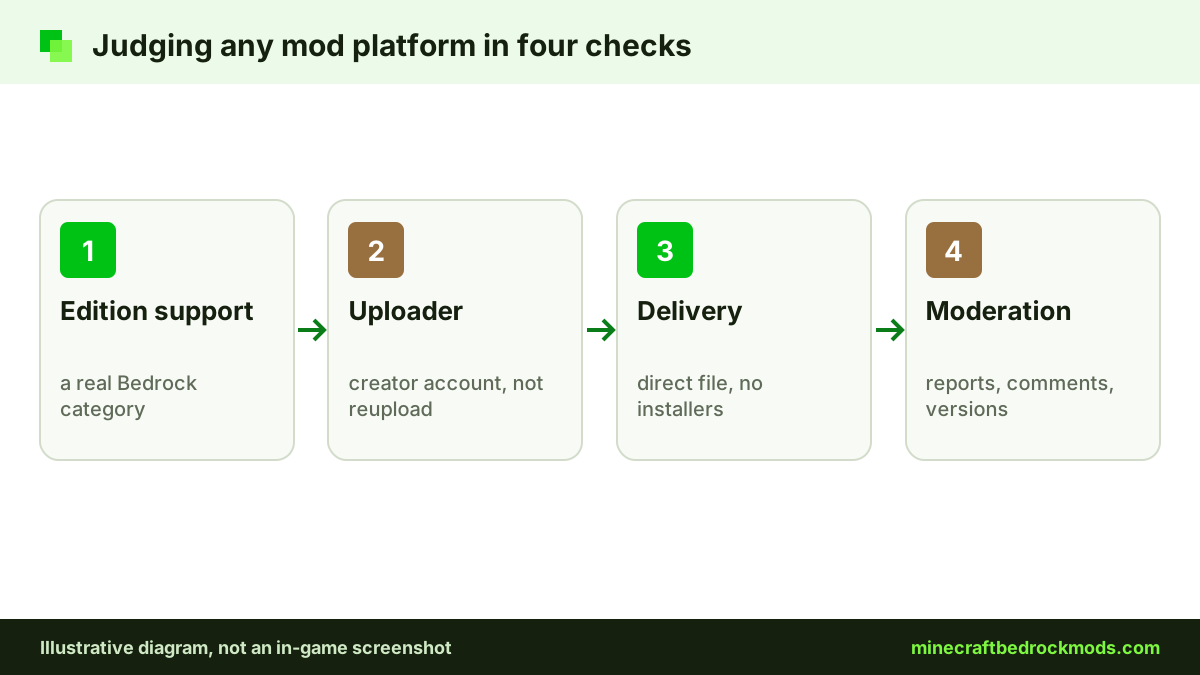
- Does it support your edition? Look for an explicit Bedrock category and check the file types on real listings.
- Who uploads the content? Creator accounts make it easier to tell originals from reuploads.
- How are downloads delivered? Direct downloads beat chains of link shorteners and countdown pages.
- Is there moderation? Reporting tools and active comments are healthy signs.
- Are versions clear? Good listings state the supported game version and last update.
- Does it respect creators? Look for credits, license information and rules against reuploads.
A platform that fails a few of these checks is not automatically malicious, but it deserves extra caution. Anything that asks you to install an executable or an extra app to "unlock" an add-on fails the most important test of all, whatever the site's name or reputation.
Platform Notes
- Android and iOS: import Bedrock files by opening them; a .jar file will never open in Minecraft.
- Windows 10/11: the Bedrock app and Java Edition are separate games, so keep downloads for each in separate folders.
- Consoles: Xbox, PlayStation and Switch cannot import community .mcpack or .mcaddon files. Use the Marketplace, or join a Realm or world that already has packs. Our console add-ons guide explains the options.
Version Note
This guide reflects Minecraft Bedrock 26.60, the latest stable release when checked on November 5, 2026. Marketplace listings and community hosts change often, so confirm the supported version on each download page before installing.
Troubleshooting Wrong-Edition Downloads
- The file will not open: it is probably a .jar or a Java resource pack; look for a Bedrock edition instead.
- A .zip downloaded instead: it may be a Java pack, or a Bedrock pack that needs renaming per the creator's instructions. Read the page first.
- Import works but nothing changes: activate the pack in the world's Behavior Packs or Resource Packs screen.
Safe Habits on Whatever Platform You Use
Scan downloads on Windows, confirm the extension, and read comments for reports of broken versions. Back up your world before activating anything new. Remember that only add-ons released through the Marketplace allow achievements, and experimental toggles can restrict where a world can be played. Our Bedrock mods safety guide covers fake installers and survey walls in detail.
Frequently Asked Questions
Modrinth focuses on Java Edition content, so it is not a primary source for Bedrock add-ons. Bedrock players are better served by the CurseForge Bedrock section, MCPEDL, ModBay, creators' own pages or the Marketplace.
Not in any reliable, general way. Java mods are compiled Java code, while Bedrock uses JSON packs and a JavaScript Script API. Bedrock versions exist only when a creator rebuilds them, such as the official Marketplace ports of Naturalist and Decocraft.
No. They are made for Java shader loaders. Bedrock has its own graphics options and resource packs, distributed through Bedrock-focused sources.
The Minecraft Marketplace. Xbox, PlayStation and Switch cannot import community add-on files, so the in-game store, or joining a Realm or world that already has packs, is the route.
Only add-ons released through the Minecraft Marketplace allow achievements. Community add-ons from other sites do not, and cheats also turn achievements off.
Check the file extension. Java mods are .jar files, while Bedrock content uses .mcpack, .mcaddon, .mcworld or .mctemplate. The listing should also state which edition and game version it supports.
Conclusion
Modrinth is an excellent home for Java Edition content, which is exactly why it is not where Bedrock players should expect to find add-ons. Java mods are compiled .jar files, while Bedrock reads behavior and resource packs from .mcpack, .mcaddon, .mcworld and .mctemplate files.
For Bedrock, use the CurseForge Bedrock section, MCPEDL, ModBay, creators' own pages and the Marketplace, which now carries official ports such as Naturalist and Decocraft. Judge every source by edition support, clear uploads, direct downloads and respect for creators, and keep your Java and Bedrock downloads apart.