Making your own Bedrock add-ons is easier than most players expect. You do not need to learn Java or install a mod loader, because Minecraft Bedrock mods are built from folders of JSON files, images and, optionally, JavaScript. If you have ever wondered how the packs you download are put together, this beginner guide walks through the pieces, the free tools creators use, and how to test and share a first project without breaking anything.
Behavior Packs vs Resource Packs
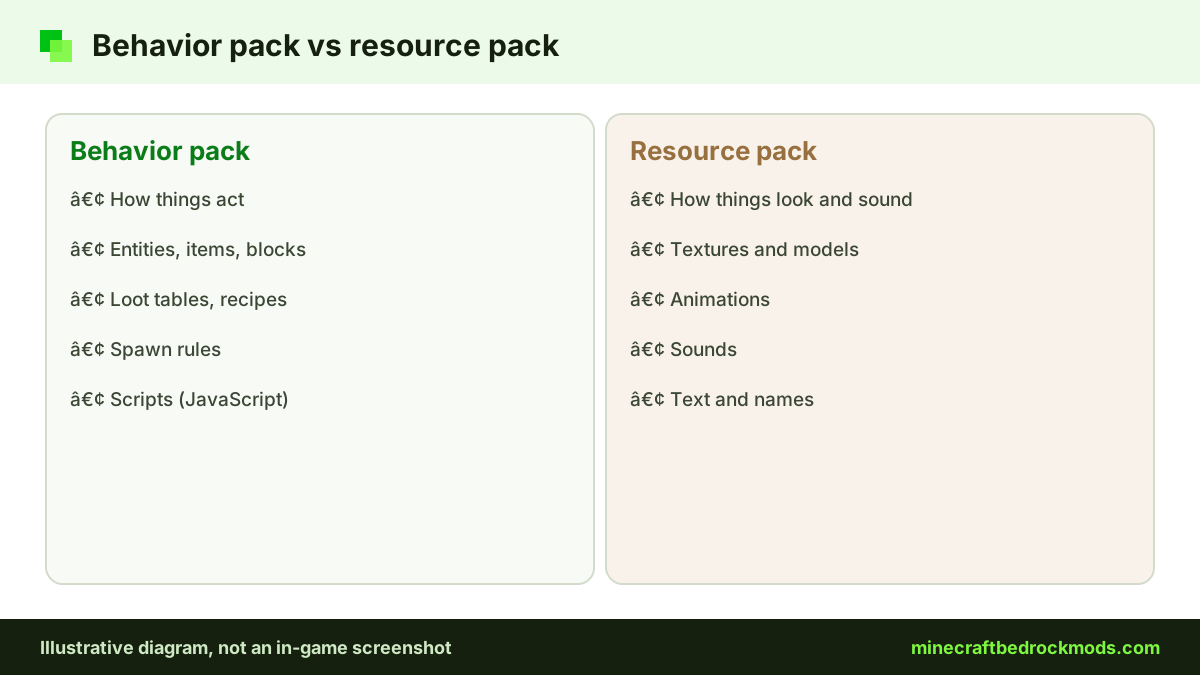
Every Bedrock add-on is made of one or two pack types. A behavior pack changes how the game works: entity behavior, items, blocks, loot tables, recipes, spawn rules and scripts. A resource pack changes how things look and sound: textures, models, animations, sounds and text. A new mob usually needs both, because the behavior pack defines what it does and the resource pack defines what players see.
Microsoft Learn has a starter tutorial for each side. The intro to behavior packs builds an "Angry Cow", and the intro to resource packs makes custom grass blocks. Both are short and make a good first afternoon project.
Manifest.json Basics for Bedrock Add-ons
Each pack needs a manifest.json file in its root folder. It tells Minecraft what the pack is called, which version it is and what it contains. These are the parts you will meet first:
| Field | What it does | Beginner note |
|---|---|---|
format_version | Says which manifest layout the file uses | Copy the value from the current Microsoft Learn template |
header | Holds the name, description, uuid, version and minimum engine version | The name and description appear in the pack list |
uuid | A unique ID for the pack | Generate a new one; never copy another pack's uuid |
version | Your pack version as three numbers, such as [1, 0, 0] | Raise it every time you share an update |
modules | What the pack contains: data, resources or script | Each module needs its own separate uuid |
dependencies | Other packs or script modules this pack needs | Link your behavior pack to its resource pack by uuid and version |
A minimal behavior pack header reads "name": "My First Pack", "uuid": "<new uuid>" and "version": [1, 0, 0], followed by one module with "type": "data". A resource pack is the same, except its module type is resources.
Tip: Duplicate UUIDs are a classic beginner mistake. If two packs share one, Minecraft can treat them as the same pack, refuse the second import or show the wrong one in the list.
Folder Structure and Development Folders
While you build, keep your packs in the development folders inside Minecraft's com.mojang directory: development_behavior_packs and development_resource_packs. They are meant for work in progress, so you can edit, re-enter your test world and see changes without re-importing. The location of com.mojang depends on your platform and game version, so check the Microsoft Learn getting started guide for the current path.
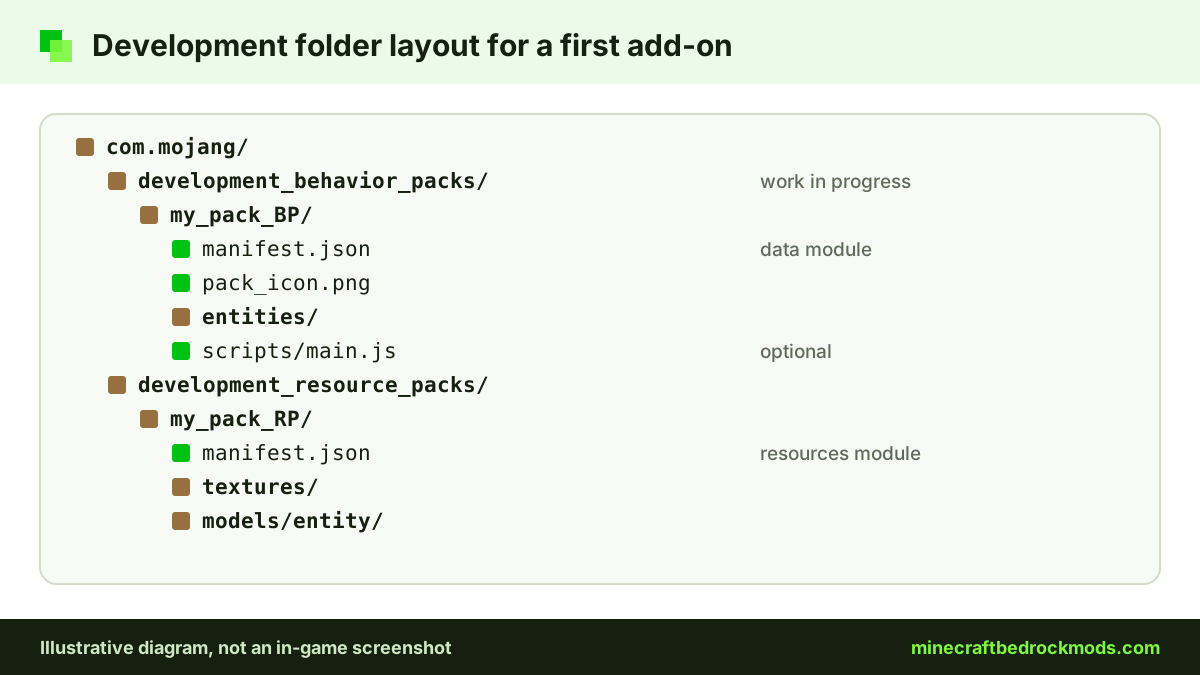
Folder names such as entities and textures matter, because the game looks for content in specific places. Follow the layout in Mojang's official bedrock-samples repository, which contains the vanilla behavior and resource packs. Opening the vanilla cow files there is one of the fastest ways to learn how a real entity is defined.
Tools: Blockbench, bridge. and a Text Editor
You can write an entire add-on in any text editor, but two free, open-source tools make the job smoother.
Blockbench for models
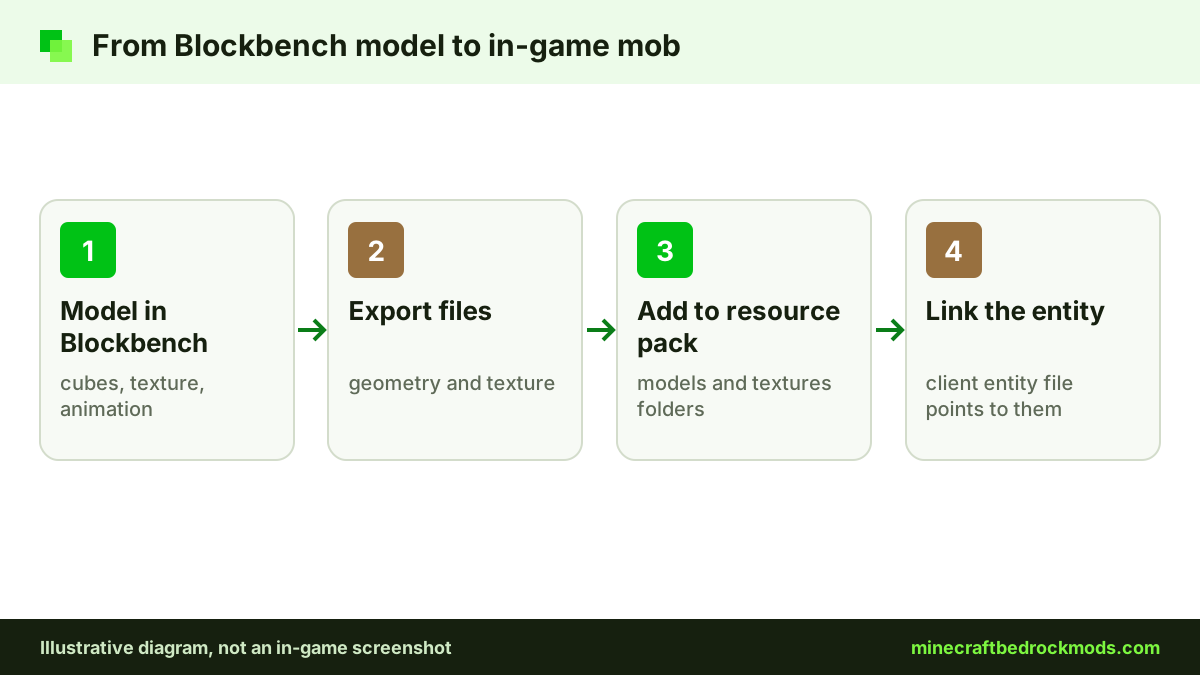
Blockbench is a free low-poly 3D model editor widely used for Bedrock entity and block models. You shape a model from cubes, paint its texture, animate it and export the files a resource pack expects.
bridge. for pack projects
bridge. is an IDE built specifically for Minecraft add-ons. It understands how behavior and resource packs are organized, which helps you keep a growing project tidy. Like Blockbench, it is open source. A plain text editor stays the most flexible option, but gives no Minecraft-specific help.
| Tool | Best for | Learning curve | Watch out for |
|---|---|---|---|
| Blockbench | Entity and block models, textures, animations | Moderate, visual | It shapes how things look; behavior still lives in JSON |
| bridge. | Organizing and editing whole add-on projects | Moderate | Learn pack basics first so you understand its files |
| Plain text editor | Manifests, small edits, scripts | Low to start | No add-on checks; validate your JSON carefully |
Script API Basics for Minecraft Bedrock Mods
JSON can do a lot, but the Script API adds real logic. Scripts are written in JavaScript (TypeScript also works if you compile it to JavaScript) and use modules such as @minecraft/server and @minecraft/server-ui. Script API releases ship with game updates: Bedrock 26.60 released @minecraft/server 2.11.0, and 26.50 released 2.10.0.
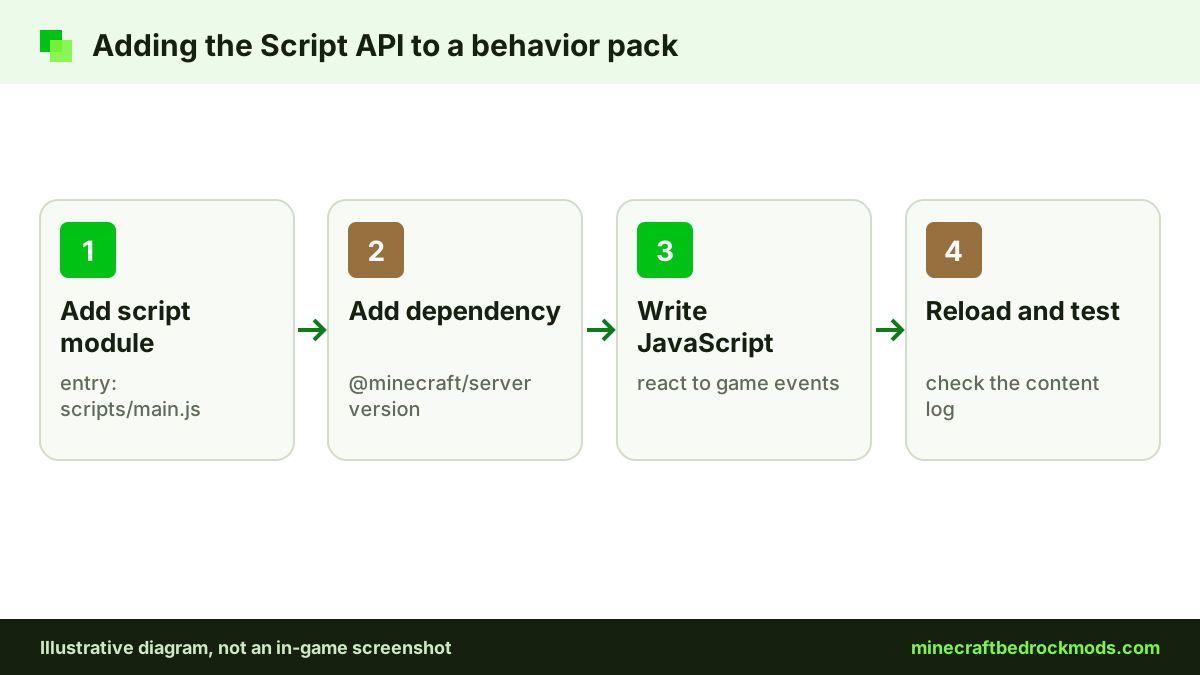
To use scripts, a behavior pack adds a script module that points to an entry file such as scripts/main.js, plus a dependency on @minecraft/server with the version you target. Your code can then react to in-game events. Start with the official introduction to scripting and keep the Script API reference open while you work.
Testing Your Add-on in a Copy World
Never test a new pack in a world you care about. Create a fresh creative test world, or use Copy World on an existing one, and activate your packs there. A buggy pack can leave placeholders behind once it is turned off. Our world backup and transfer guide explains how to keep a safe copy first.
- Activate both the behavior pack and its resource pack, then check that your entity or item looks and acts as expected.
- If your pack relies on beta script modules or experimental features, turn on the matching toggles under Experiments and note them for players.
- Re-enter the world after each change and test one feature at a time.
- Use the content log described in the Microsoft Learn creator docs, so loading errors are reported instead of failing silently.
Keep in mind that community add-ons do not earn achievements; only add-ons released through Minecraft Marketplace allow them. Our add-ons and achievements guide explains the rules.
Packaging Your Pack as .mcaddon
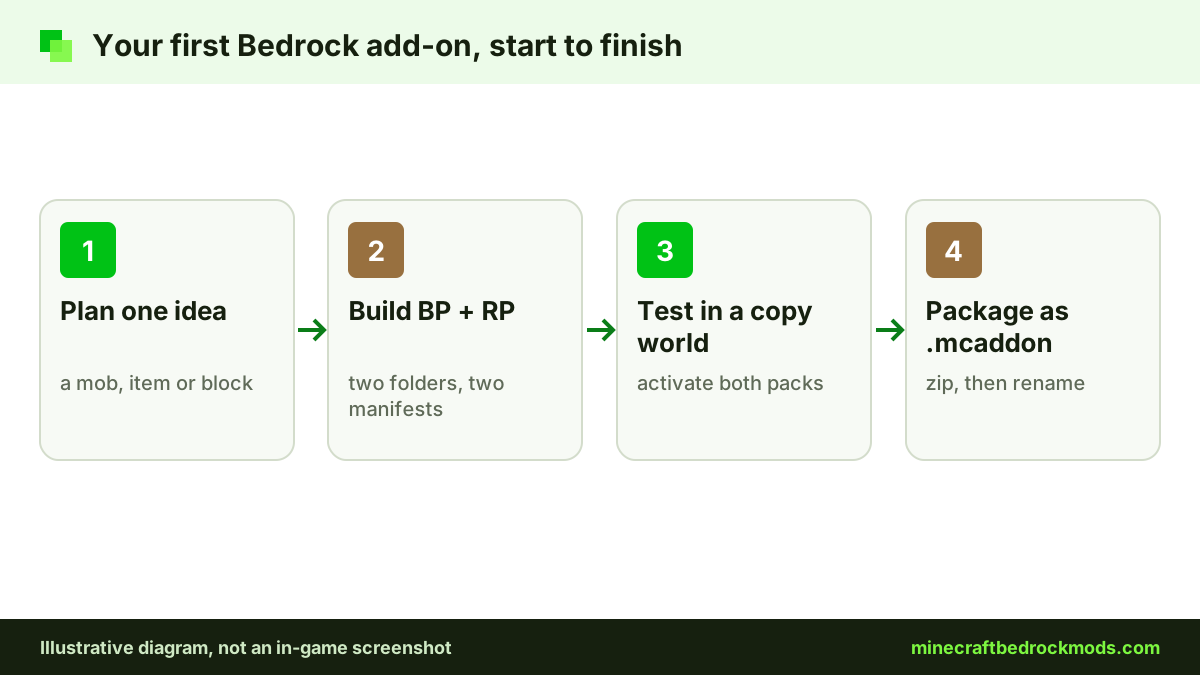
When the add-on works, package it so others can import it in one step. A .mcpack holds a single pack, while a .mcaddon bundles several, usually your behavior and resource packs together. Both are ordinary zip archives with a different extension.
- Copy the finished pack folders out of the development folders.
- Zip the behavior pack and resource pack folders together, with each manifest at the top of its own folder rather than one level deeper.
- Rename the archive from
.zipto.mcaddon. - Remove your development copies, then open the .mcaddon on a test device to confirm it imports cleanly.
Removing the development copy first matters because two packs with the same UUID can clash. Our add-on download and install guide shows what players see when they import your file.
Sharing Your Add-on Responsibly
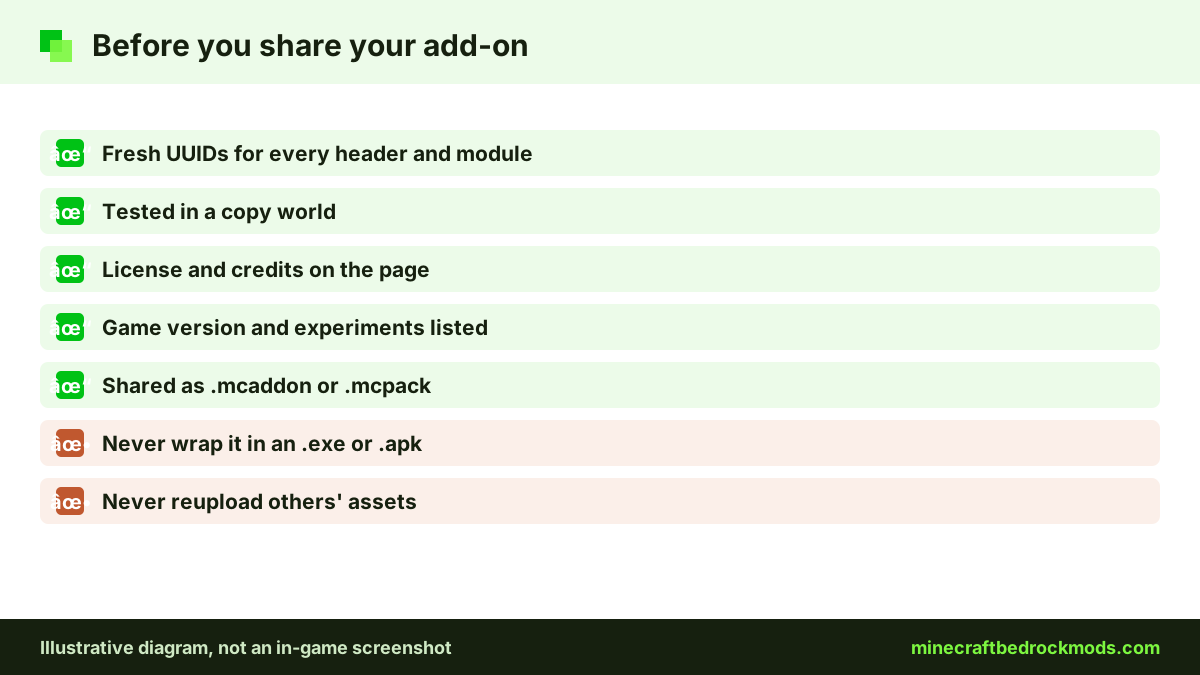
- Use only your own work or assets you have permission to use, and credit anyone whose models, textures or code you include.
- Pick a license and state it on the download page, so players know whether they may edit or reupload your pack.
- Write honest notes: supported game version, required experiments, and whether the download is a behavior pack, a resource pack or both.
- Share the plain file, never an .exe or .apk installer. Players rightly distrust those, as our add-on safety guide explains.
Free packs are usually shared on community hosts with Bedrock sections. Selling on the Marketplace goes through Mojang's official creator channels, which start at the Minecraft creator portal.
Version Note
This guide was written for Minecraft Bedrock 26.60, the latest stable release when checked on November 5, 2026. Updates can change manifest fields, script module versions and folder paths, so read the 26.60 changelog and Microsoft Learn before sharing a new build. After each game update, retest your pack and raise its version when you change it.
Platform Notes for Add-on Creators
- Windows 10/11: the easiest place to create, with full folder access plus desktop Blockbench and bridge. Our Windows add-on guide covers importing and pack order.
- Android: fine for small edits with a file manager and text editor, but folder access varies by device and Android version.
- iPhone and iPad: file access is more limited, so most creators build on a computer and test by importing the .mcaddon.
- Consoles: Xbox, PlayStation and Switch cannot import community .mcaddon files, so you cannot test or share packs there directly. Console friends can play your add-on by joining a world or Realm that already runs it.
Troubleshooting Common Beginner Errors
- Pack does not appear: the manifest is missing, sits one folder too deep, or has a JSON error such as a trailing comma.
- Wrong pack shows or import is refused: two packs share a UUID; generate fresh ones for the header and every module.
- Entity is invisible or untextured: the resource pack is inactive, or a texture or model path does not match.
- Script does nothing: check the script module, the entry path and the
@minecraft/serverdependency version, and enable any required beta toggle. - Changes do not show: make sure you edited the development copy, not an imported one, then re-enter the world.
Safety for Young Creators
Making add-ons is a safe, creative hobby, but sharing online brings the usual risks. Younger creators should publish with a parent's help, keep personal details out of pack credits, and never download "creator tools" from unknown sites. Blockbench, bridge. and the Mojang samples all come from official pages and GitHub, so skip reuploads.
Frequently Asked Questions
No. Many add-ons are just JSON files plus textures and models. JavaScript through the Script API is optional and useful once you want custom logic.
A .mcpack holds a single behavior or resource pack. A .mcaddon bundles several packs, usually a matching behavior and resource pack, so players import everything in one step. Both are zip archives with a renamed extension.
Small edits are possible on Android, but folder access varies by device, and iPhone and iPad are more limited. Most creators build on a Windows PC and test on phones by importing the finished file.
Script API releases ship with game updates. Bedrock 26.60 released @minecraft/server 2.11.0. Check the Microsoft Learn Script API reference to see which versions are stable and which features still need a beta module.
Not automatically. Java mods are compiled Java code, while Bedrock add-ons are JSON packs and JavaScript. A Bedrock version has to be rebuilt for the add-on system, and you need the original creator's permission to port their work.
Consoles cannot import community .mcaddon files. Console players can still use your pack by joining a world or Realm that already has it applied, set up from Windows, Android or iOS.
Conclusion
Your first Bedrock add-on only needs two folders, two manifests with fresh UUIDs and a little patience. Start with the Microsoft Learn behavior and resource pack tutorials, borrow structure from Mojang's bedrock-samples, and use Blockbench and bridge. when plain text editing starts to feel slow.
Test everything in a copy world, package the result as a .mcaddon, and share it with a clear license, honest notes and credit for anyone who helped. Once that loop feels familiar, the Script API is waiting for your next idea.